Create Features
Summary
Below are a handful of examples to get started with making custom features. For additional resources, review the following for type information and possible builder.with arguments.
It is safe to pass an empty string as a selector into the methods within UICommandBuilder. The builder provided is safely wrapped to ensure the entry point of the selector is nested within the UI hierarchy.
Counter Example
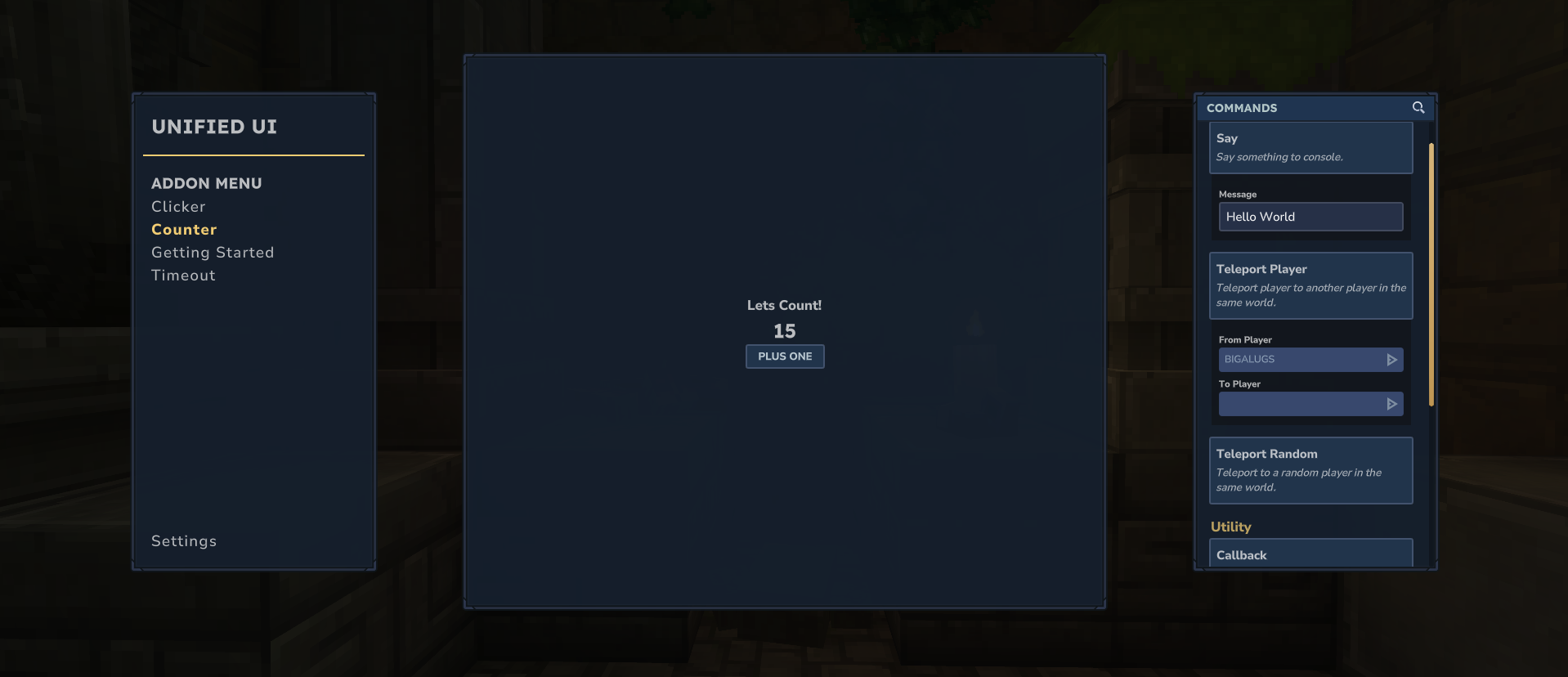
This is a basic example of how you can define a feature, using a .ui File or appendInline() method.
This demonstrates defining the UI with UICommandBuilder, handling the dynamic display of a counter value, and responding to the button click event.
Take note of how playerCounter is declared. The instance of ExampleFeature lives on the server, but when getFeatures() is called, you have access to the playerRef and can narrow down to the current player that the content is being rendered for. This is just an example, but in a real-world situation you would access a static instance, or pass a provider service to the constructor of ExampleFeature to supply outside data.
public class ExampleFeature implements UuiExtension {
	private final Map<UUID, Integer> playerCounter = new HashMap<>();

	@Override
	public CompletableFuture<List<FeatureDefinition>> getFeatures(PlayerRef playerRef) {
		// Initialize the Builder
		var featureBuilder = new FeatureDefinition.Builder(
			"counter",	// Feature ID
			"Counter"	// Display Name
		);

		// OPTION A: Build the interface using inline method.
		featureBuilder.withBuildUserInterface((builder) -> CompletableFuture.supplyAsync(() -> {
			int currentCount = playerCounter.getOrDefault(playerRef.getUuid(), 0);
			var filePath = "Example/Counter.ui";
			builder.append("", filePath);
			builder.set("#CountValue.Text", String.valueOf(currentCount));
			return null;
		}));

		// OPTION B: Build the interface using file method.
		featureBuilder.withBuildUserInterface((builder) -> CompletableFuture.supplyAsync(() -> {
			int currentCount = playerCounter.getOrDefault(playerRef.getUuid(), 0);
			var doc = """
				Group #RootElement {
					Anchor: (Full: 0);
					FlexWeight: 1;
					LayoutMode: MiddleCenter;
					Label {
						Text: "Hello World!";
					}
					Label {
						Text: "%s";
					}
					TextButton #AddButton {
						Anchor: (Width: 100);
						Text: "Plus One";
					}
				}
				""";
			var docParsed = doc.stripIndent().replace("\t", "  ").formatted(currentCount);
			builder.appendInline("", doc);
			builder.set(
				"#RootElement.Background",
				Value.ref("UnifiedUI/Shared/Container.ui", "ContainerSimpleBackground")
			);
			return null;
		}));

		// Add event for the button click.
		featureBuilder.withGetEventDefinitions(() -> CompletableFuture.supplyAsync(() ->
			Collections.singletonList(
				new FeatureEventDefinition(
					"#AddButton",
					"increment",
					CustomUIEventBindingType.Activating,
					Collections.emptyMap(),
					Collections.emptyMap()
				)
			)
		));

		// Handle click event and increment counter.
		featureBuilder.withHandleEvent((action, actionArgs, elementData) ->
			CompletableFuture.supplyAsync(() -> {
				if (!action.equals("increment")) {
					return false;
				}
				var currentCount = playerCounter.getOrDefault(playerRef.getUuid(), 0);
				playerCounter.put(playerRef.getUuid(), currentCount + 1);
				return true;
			})
		);

		// Build and return feature.
		var feature = featureBuilder.build();
		return CompletableFuture.completedFuture(List.of(feature));
	}

	@Override
	public CompletableFuture<List<CommandDefinition>> getCommands(PlayerRef playerRef) {
		return CompletableFuture.completedFuture(List.of());
	}

	@Override
	public CompletableFuture<Void> onPageClose() {
		playerCounter.clear();
		return CompletableFuture.completedFuture(null);
	}
}
// NOTE: copy/pasting this directly could result in error due to tab space parsing in Hytale.

$Common = "../Common.ui";
$UuiContainer = "../UnifiedUI/Shared/Container.ui";
$UuiTypography = "../UnifiedUI/Shared/Typography.ui";

$UuiContainer.@ContainerSimple {
    #Content {
        LayoutMode: MiddleCenter;
        $UuiTypography.@LabelH3 {
            Text: "Lets Count!";
        }
        $UuiTypography.@LabelH1 #CountValue {
            Text: "";
        }
        $Common.@SmallSecondaryTextButton #AddButton {
            Text: "Plus One";
        }
    }
}